

Run a clinic and the phone is still the first thing a patient touches. It’s also where things go sideways. Somebody calls about a refill, nobody picks up, and now they’re irritated before they’ve even booked.
For years, the VoIP-versus-landline question was dull. Dial tone, monthly rate, done. That’s over. The answer now pulls in your budget, your HIPAA exposure, and whether the person at the front desk sees anything useful on their screen when the phone rings.
Here’s the mechanical part. VoIP, short for Voice over Internet Protocol, chops your voice into data and ships it over the internet. Copper can’t do that. This is the whole reason VoIP can sit on top of patient records, video visits, text threads, the lot.
That same plumbing runs under most virtual-care platforms now, so a lot of what you’ll weigh here also shows up when teams scope out telemedicine software development services. Treat the decision as a business one. Not an IT one.
What’s the Difference Between VoIP and Traditional Phone Systems?
VoIP moves calls as data packets over the internet. The old setup, PSTN or the Public Switched Telephone Network, sends analog voice down copper and wants fresh wiring for every line you bolt on. Software against hardware. That one gap is the root of nearly everything else below.
A landline rings. That’s the job. That’s the whole job. VoIP acts more like an app, so a single call can pull up a patient’s chart, jump into a video visit, or follow a doctor’s cell as they bounce between exam rooms. Same reason it ended up underneath most remote-care tools instead of off to the side somewhere.
So the real question was never “does it sound clear.” It’s what the system can do, and whether it keeps you compliant. Four areas settle it most of the time: cost, reliability, HIPAA, features. One at a time.
How Do the Costs Compare for a Medical Practice?
Figure on 30 to 50 percent cheaper per month with VoIP. Figure loosely, though, because the gap swings on how many lines you keep, how many locations you cover, and how much of your current gear survives the switch. The table lines the two up across the costs that actually land on a practice budget.
| Cost category | Traditional / PSTN | VoIP |
| Setup and hardware | Wiring, PBX hardware, per-line install | Often runs on existing devices and internet |
| Monthly per line | Higher, fixed per physical line | Lower, typically per user |
| Adding a line | New wiring and a service visit | A software change in the admin panel |
| Maintenance | On-site service for hardware faults | Handled by the provider |
Methodology: cost categories and the 30 to 50 percent savings range reflect published healthcare VoIP provider comparisons and industry reporting; actual figures vary by provider and practice size.
i. Upfront and Hardware Costs
Landlines hit you harder on day one. Wiring, a PBX box (that’s the Private Branch Exchange), an installer out to the building for every line. VoIP mostly rides the laptops, headsets, and phones your people already carry. Add softphone apps and a small practice spends close to nothing on handsets.
ii. Monthly Service and Scaling Costs
This is where VoIP pulls away over time. Add a landline and you book new wiring and a technician. Add a VoIP user and you change a setting in an admin panel. It takes minutes.
That gap bites hardest when your staffing shifts. Seasonal flu-clinic hires, a second location, a telehealth team that grows and shrinks by the month, all of it costs far less to support when a line is software instead of copper.
iii. Hidden Cost of Downtime and Missed Calls
The invoice almost never shows the priciest number of all: the patient who calls, hears nothing, and books with the practice down the road. When a landline system fails, calls just vanish until a technician shows up. One dead appointment line on a busy morning can cost more in a day than the whole monthly fee, which is exactly why downtime belongs in any honest cost comparison.
Which System Is More Reliable in a Clinical Setting?
VoIP can satisfy HIPAA, the Health Insurance Portability and Accountability Act. The catch is two things together: a signed BAA, the Business Associate Agreement, and real encryption. An analog line hands you no BAA at all, and it was never built for compliant recording, voicemail, or messaging in the first place. So you’re not asking whether VoIP can be compliant. You’re asking whether you bothered to set it up that way.
i. Power and Internet Outages
This is the single biggest reason a few clinics hang on to one analog line. If the building loses power and the backup generator is busy keeping medical equipment alive, a copper line still rings. Same logic for rural sites where broadband keeps dropping. For a practice in that spot, one emergency landline is cheap insurance.
ii. Redundancy and Failover Features
VoIP fights back with software instead of wire. The bits that keep calls alive through an outage:
- Auto-rerouting that flings calls to staff cell phones the second the office link drops
- More than one data center, so a single dead server doesn’t drag everything down with it
- Battery and cellular backup on the devices that count, enough to ride out a short outage
Done right, VoIP can stay reachable through a closure that would leave a landline mute, since the calls chase your people instead of the building they walked out of.
The graphic below boils down how the two stack up on the things practices fret about most.
Features and Integrations That Matter in Healthcare
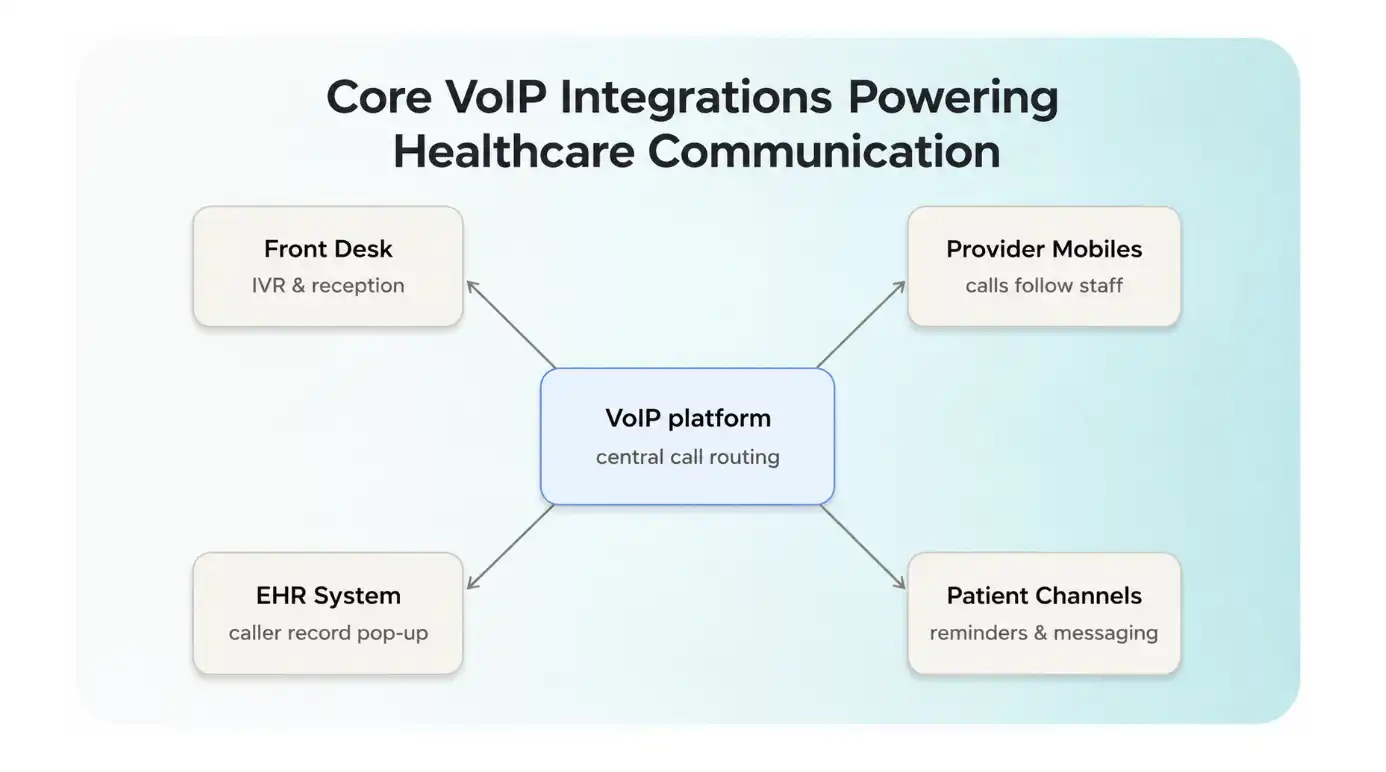
VoIP carries features copper simply cannot, by design. The ones worth paying for in a clinic aren’t gimmicks. They’re the integrations that hand the front desk its time back and keep appointments from slipping through.
i. BAA, Encryption, and Access Controls
A compliant VoIP setup rests on a short checklist:
- A signed BAA with your VoIP provider, which makes them a responsible business associate
- Encryption on calls, voicemail, and any messaging that so much as touches patient information
- Role-based access, so staff reach only the records and recordings their job actually needs
A consumer-grade VoIP plan usually trips on the first item. No BAA, no compliant path, and the call quality makes no difference.
ii. Penalty Exposure and Why it Shapes the Decision
None of this is abstract. In 2025, HIPAA fines run from $13,785 to $63,973 per violation, and the worst tier, willful neglect left uncorrected, carries a $2 million annual cap. A phone system that fumbles patient data turns a communication choice into a measurable financial risk, and that risk is what nudges most regulated practices toward a properly configured VoIP setup over a messy patchwork of lines.
Features and Integrations That Matter in Healthcare
VoIP carries features copper simply cannot, by design. The ones worth paying for in a clinic aren’t gimmicks. They’re the integrations that hand the front desk its time back and keep appointments from slipping through.
i. EHR and Practice-Management Integration
This one changes the whole day. Wire VoIP into your EHR, the Electronic Health Record, and the patient’s chart pops the moment they call. Staff click the number straight off the record. No more scrambling for the right file while somebody waits on hold, stewing.
ii. Automated Routing and Appointment Reminders
IVR routing, the Interactive Voice Response kind, parks callers at the right desk without a human shuffling them around. Reminders by call or text knock down no-shows pretty reliably, which guards the schedule and the money tied to it.
iii. Secure Messaging Between Staff and Patients
Encrypted messaging lets staff and patients trade information without slipping back to personal phones or unsecured email. Run inside a compliant VoIP platform, it keeps that exchange in the same audited, BAA-covered system as your calls.
Final Words
For most practices, VoIP comes out ahead on cost, mobility, and the way it plugs into everything else, while one stubborn landline still pays for itself as the backup for when the lights go out.
Before you rip anything out, answer three questions. How many calls do you really field? One site or several? And how is this thing going to handle HIPAA and talk to your EHR? Sort those, and the choice tends to make itself.